Who Knows (www.whoknows.co.za) is a great website which has all kinds of interesting and handy contact details on it. (Please note that this web site is for South Africa only).
If you want to find a number of somebody who can help you with a particular problem (eg Loadshedding or your town council), look no further.
I have bookmarked (and blogged) it!
http://www.whoknows.co.zaLabels: Handy Stuff
By: RexMan | Tuesday, July 1, 2008 at 2:18:00 PM | |
I was recently running Open Office, loved it but found it pretty restrictive when working with MS Office users. So….I moved over to the dark side L. The problem is, that I have my whole library of docs in Open Office format. I have already uninstalled Open Office and am not too keen on reinstalling and converting every single document. My other option was to open the documents using Google Docs and convert them there. I would still need to convert each document in a very tedious way. The lazy side of me came shinning through and I started the big hunt for a conversion program. I found it here. This is an Add-In which allows you to open ODF and ODS files from the MS Office file menu.
Thanks very much to the developers for this!
Labels: Handy Stuff, software
By: bossmanthe | Friday, June 27, 2008 at 9:44:00 AM | |
Stewart Moss's Technology tip:Here is a great tech tip.How to shutdown your computer (Windows XP) using an email with a special subject line!
Prerequisites:1. Outlook (not Outlook express) I tried this using Outlook 2003 from MS Office 2003.
2. Windows XP (The batch file I am going to show you is for Windows XP, but you can change it for Windows 98 up to Windows Vista)
3. Internet Connection (Duh)
Methodology:Note: If you have any problems during this process, please consult the MS Office documentation about setting up rules.
Step 1:
Make a batch file on your hard drive which will shut down your computer.
Here is an example of my batch file for Windows XP:
@echo off
shutdown -s
I called my batch file "shutdowncomputer.bat".
Step 2:
Open Outlook and go to the "Tools" menu. Choose "Rules and Alerts"

Step 3:
On the opened "Rules Dialog" choose "New Rule"

Step 4:
Choose "Start with a blank rule" and make sure that "Check messages when they arrive" is selected. Click "Next".

Step 5:
Choose the rule to activate with "Specified words in the Subject". Click on "Specified words" hyperlink and add in your subject line you want. The command will fire when outlook sees an email with that subject line. I chose "Shutdown my computer" but I suggest something
way more secure than that!
Click "Next"

Step 6:
Choose the action "Start Application". It is quite far down the list.

Step 7:
Click on the hyperlink "application" and change the file dialog to "Show all files (*.*)". Choose the batch file to run. Then click "Next".

Step 8:
Click "Finish" to end adding a new rule. Outlook will prompt you that this type of rule (to execute commands) can only be run from the client and while the client pc is running.

I hope you enjoyed this tech tip!
Stewart Moss
Labels: Computer Tips, Handy Stuff
By: RexMan | Thursday, April 10, 2008 at 4:22:00 PM | |
An attempt to answer common myths about copyright seen on the net and cover issues related to copyright and USENET/Internet publication.
read more |
digg storyLabels: Handy Stuff
By: bossmanthe | Tuesday, January 29, 2008 at 11:45:00 AM | |
A great reference guide which displays on your ipod as notes. Really handy!"Featuring a handy overview of CSS concepts, and in-depth information for every selector, property and @rule of CSS 2.1, the CSS podGuide is a must have for any web developer with an iPod, and just one more reason to get an iPod if you don't already have one."
read more |
digg storyLabels: Devices and Gadgets, Handy Stuff
By: bossmanthe | at 11:44:00 AM | |

Andrew (
http://andrewtjackson.blogspot.com/) sent me a cool link to a site which deals exclusively with all the settings in Connection Strings.
Connection strings are used by programmers to connect to databases and there can be a bewildering array of settings which can affect the connection. Also, to make matters worse, each database driver has it's own unique settings.
Visit this site to find out all kinds of connection string settings for SQL Server, Oracle, Postgres, Firebird, Excel, Access, Textfiles, Lotus Notes, Exchange, DSN, UDL, AS/400 and more!! Very useful for a programmer!
http://www.connectionstrings.com/Labels: Handy Stuff, Programming
By: RexMan | Friday, January 18, 2008 at 10:31:00 AM | |
As an avid user of regular expressions, I find any RegEx tool very very handy.
Here are some that I have used and like and a short review of each. I rate
Expresso as
the best tool I have used!
Expresso (
http://www.ultrapico.com/Expresso.htm )
A powerful tool for both beginners and advanced RegEx programmers alike!

Pros:
- Very powerful visual expression builder including hex expressions (for those people like myself who always seem to get the syntax wrong!)
- RegEx Analyser to show you visually what your expression means
- RegEx Validator to show your expression parsing visually
- Timing tests to help you optimize very complex expressions
- Export results to XML, CSV, TAB delimited and plain text
- Expression Library for common expressions
- Recently used expression list
- Code generator(C#, c++ and VB.net)
- Compile to Assembly DLL
- Load test data from file or load expression from file
- Hints at startup
- Lots of built in help and RegEx guide
- Freeware registration
Cons:
The Regulator (
http://tools.osherove.com/CoolTools/TheRegulator/tabid/185/Default.aspx )
Not a bad tool with a few unique features.
Pros:
- Plugin Support
- Built in support for http://regexlib.com/ online RegEx repository
- Generate Code (C# and VB.NET)
- Compile to Assembly DLL
- Javascript or JScript support
Cons:
- Online search of repository did not work for me
- None of the advance analysis and testing features of Expresso
- No clear visual feedback of expression results
- Not as polished as Expresso
RegExDesigner.NET (
http://www.sellsbrothers.com/tools/#regexd )
A lightweight tool to perform basic regular expression operations.
Pros:
- .NET (C# and vb.net) Code Generator and Compile to Assembly DLL
- Really small download (260Kb)
- Nice and small and quick to use
- Freeware
Cons:
- Not very feature rich
- No advanced features
- No "debugging" of RegEx
Labels: Handy Stuff, Programming, software
By: RexMan | Wednesday, December 5, 2007 at 8:40:00 AM | |
TortoiseSVN has released another very useful tool to manage your SVN (Subversion) repository.
CommitMonitor: It sits in the task tray and allows you to poll your SVN repository every few minutes and shows you the new commits!
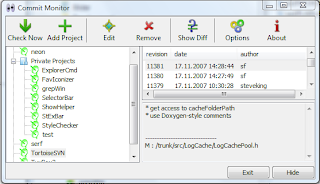 Tool's homepage is here!
http://tools.tortoisesvn.net/CommitMonitor
Labels: Handy Stuff, Programming, software
By: RexMan | Tuesday, December 4, 2007 at 3:50:00 PM | |
The following file:
South African Public Holidays
http://www.new-heights.co.za/files/South_Africaholidays Comma Seperated File.zip This download contains a CSV (Comma Separated File) inside a zip file. You need to extract the zip file before you can import the CSV file into your calendar.
Calendars can be imported into Outlook, Google Calendar, Yahoo Calendar, iCAL and any calendar application that can import a Comma Separated Value (CSV) file.
To import this calendar into iCal, please use this tool:
http://manas.tungare.name/projects/yahoo2ical/Labels: Handy Stuff
By: RexMan | Wednesday, October 31, 2007 at 11:34:00 AM | |
 Spiceworks the great free network and workstation auditing software
In our business keeping track of the IT Assets for a group of companies is challenging. There are numerous products out there to help an IT Manager do this, however they either cost an arm or a leg, or the software provider wants a copy of the information gathered, or the free stuff is just pure crap!
Well in my travels across the NET I came across
SPICEWORKS. It is seriously good remote WMI auto-discovery software.The management interface is a set of web pages with a consistent and clean look.
Key features:
- SNMP, network device and network printer scanning
- Linux scanning via SSH
- Alerts on customizable definitions (eg machines with no anti-virus or low printer toner)
- Ability to manage your software licenses
- Software automatically categorizes machines into groups. eg Laptops, servers, routers etc
- Ability to define custom devices
- Ability to compare one machine with another
There are several catches:
- Some clients you will need the administrator password for, a problem when it comes to private hardware
- You need to make sure the firewall is opened from the machine you are running the scan from to the target machine to allow WMI requests through
- The software is not 100% free as it displays some adverts
All in all this is a fantastic piece of software. I was involved in writing this type of software in the past and compared to what I wrote these guys have really taken the cake!
Download it from their website immediately and start pro-actively managing your IT assets today!

Labels: Handy Stuff, management, software
By: RexMan | Wednesday, October 3, 2007 at 8:42:00 AM | |

For many years I have had a Roamer Power 8 Gents Chronograph (A.k.a. A nice Swiss watch), however I lost the instruction manual for the thing.
After super amounts of searching on the web I came across a PDF copy and have decided to post it here to help other people who might need it.
Finally no scratching your head and trying to figure out how to reset the time or turn off the hourly chime or alarm!!!
Here is the instruction manual for the Roamer Power 8 Gents Chronograph.Labels: Handy Stuff
By: RexMan | Thursday, September 13, 2007 at 10:30:00 AM | |

I just didn't have the courage to risk bricking my PSP. Even with the promise of homebrew and ripped games. But now I might just give it a shot! Noobz has come up with genius method of unbricking your psp by installing the firmware onto your memorystick.
- You run a program on a homebrew-enabled psp
that will convert a standard PSP battery into a jigkick battery. Note
that you can't then use that battery normally - so you should use a
spare one.
- You run a program to generate the unbricker memorystick image, built from the v1.5 update EBOOT (note that this, and the custom IPL, means the release is completely free of Sony copyright materials).
- You run some programs on a PC to install the image to your memory stick.
Hope this info helps. Go
here for more detail on what to do.
Labels: Handy Stuff, PSP
By: bossmanthe | Friday, August 24, 2007 at 6:35:00 AM | |